

Memory
nod remembers lasting facts and preferences about you, so you don't have to repeat yourself.
You can see everything nod remembers, where it learned it, and change or forget it in Settings → Memory.
What nod remembers
Section titled “What nod remembers”| Kind | For example |
|---|---|
| About you | Where you work, your city, your languages |
| Preferences | Window seats, short replies, metric units |
| People | Who your manager is, your partner's birthday |
| Routines | You review invoices on Mondays |
| Lessons | Never send invoices from your personal email |
Where nod learns from
Section titled “Where nod learns from”Notes come only from your own messages and what you write or paste in Settings → Memory. nod never takes a note from its own replies, web pages, emails or tool results. Text from the web gets in only if you paste it yourself, into a short message or Settings → Memory.
- When you tell it. Say "remember that I'm vegetarian" or state a lasting fact, and nod saves it as a short note, such as Diet: vegetarian. It can be something you said a little earlier: "remember that address" saves the address from your last few messages. Each note links to the message it came from, and nod is told to keep your names and numbers exactly as you wrote them. Messages longer than 4,000 characters can't be saved this way; add a shorter note yourself.
- In the background. About once an hour, nod looks through your recent messages for what you said about your life: people, places, plans, things you bought, events with their dates and what you like. It skips messages with attachments and messages over 4,000 characters.
nod saves silently. It doesn't post a notice in chat.
Skills nod learns
Section titled “Skills nod learns”After a task that took several steps or a workaround, nod writes down how it did it: the steps on that site or app, the gotchas and what to check at the end. The next time the same job comes up, it follows its own skill instead of working it out again. When a site changes, nod fixes the skill. nod saves skills only while Save new notes is on, and not for a task you ask it not to remember.
Before a skill is saved, the memory model replaces names, addresses, contact details, order or account numbers, amounts and message content with placeholders. It's a model, so it can miss something; every skill is under Skills for you to check. Because nod writes them from what it did and read, a web page can shape a skill. A skill never lets nod act: sending, paying or deleting still goes through the trust check.
How a memory grows
Section titled “How a memory grows”Something nod picks up from one message is Mentioned once: nod uses it, but as less certain. It becomes Learned when a second message repeats it.
nod also searches your earlier messages in the current conversation when you ask about something you told it, so it can answer from the conversation itself, with the date you said it. When you send a message, it also looks up your earlier messages that match it, so a recommendation can use what you told it weeks ago. After you reset the conversation, the old one isn't searched.
stateDiagram-v2
  state "Mentioned once" as once
  state "Let go" as gone
  [*] --> once: heard once
  once --> Learned: said again
  once --> Confirmed: you confirm
  Learned --> Confirmed: you confirm or edit
  once --> gone: 60 days quiet
  Learned --> gone: replaced or expired
  Confirmed --> gone: replaced or expired
  gone --> Confirmed: you bring it back
Replaced and expired notes, and guesses not mentioned again for 60 days, move to Let go instead of being deleted. When memory reaches its size limit, the oldest notes in Let go drop off first. To delete a note right away, select Forget or ask nod to clear its memory.
Sensitive topics
Section titled “Sensitive topics”nod doesn't learn about health, religion, politics, sexuality, gender identity, ethnicity, immigration status or criminal history unless you ask it to. To let nod learn them, turn on Remember sensitive topics in Settings → Memory.
Your writing style from Gmail
Section titled “Your writing style from Gmail”When you connect Gmail, nod reads your own text from recent sent emails. It removes quoted, forwarded and automated mail first. It saves only how you write, with no facts, names or quotes, as one Preferences note labelled Learned from your sent email. A newer version replaces the old one.
Bring memory from another assistant
Section titled “Bring memory from another assistant”- In Settings → Memory, select Import, then Copy prompt.
- Paste the prompt into ChatGPT, Claude, Gemini or any other assistant, and copy its answer.
- Paste the answer into nod. nod lists the notes it found under About you, Preferences, People and Routines.
- Remove anything you don't want nod to keep, then select Import.
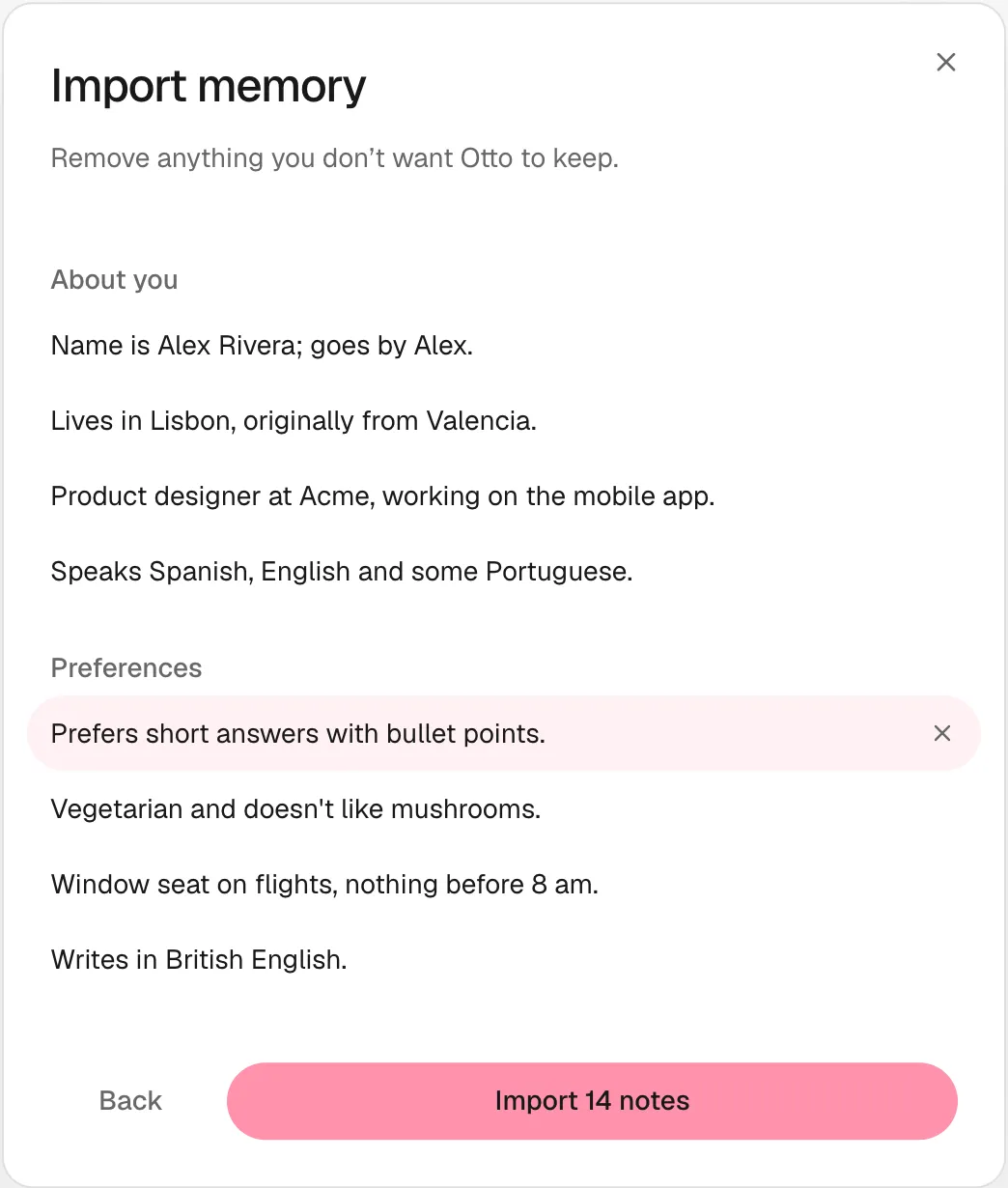
Each note is saved as written and marked Confirmed. nod skips notes you already have and lines that look like a password, code or card number.
Imported notes are like notes you add yourself: they help nod understand you and never let it act.
Review and change memory
Section titled “Review and change memory”Open Settings → Memory. Filter by All, Mentioned once, Learned, Confirmed, Let go or Skills, or search. Notes from chat show the messages they came from, and skills show the task they came from.
| To | Do this |
|---|---|
| Fix a note | Select Edit |
| Tell nod a guess is right | Select Confirm |
| Keep a note only for a while | Select End date |
| Remove a note for good | Select Forget |
| Fix or remove a skill | Open it under Skills, then Edit or Forget |
| Restore an older note | Open it under Let go, then Bring back |
| Add something yourself | Select Add note |
| Bring notes from ChatGPT | Select Import |
| Download everything | Select Export for a Markdown file |
| Stop saving new notes | Turn off Save new notes |
You can also tell nod in chat, for example "forget my old address" or "stop remembering things".
Check memory from Telegram or WhatsApp
Section titled “Check memory from Telegram or WhatsApp”Send /memory (or /context) to get a short summary. It doesn't use the model or cost anything. Telegram also receives the full export as a document.